ImgBurn 2.5.7.0
Lightning UK - 5.84MB (Freeware)
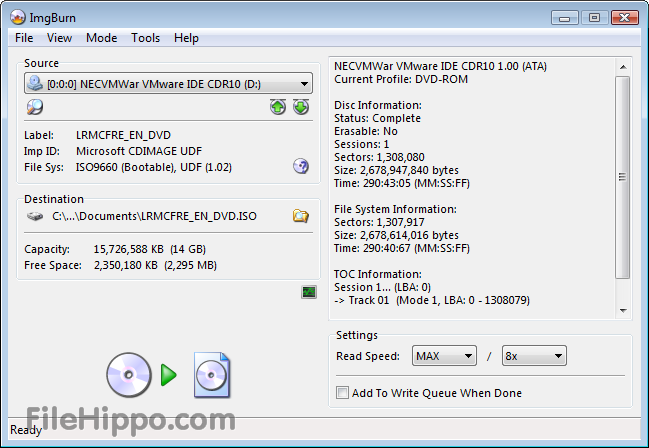
ImgBurn is a lightweight CD / DVD / HD DVD / Blu-ray burning application that everyone should have in their toolkit!
It has several 'Modes', each one for performing a different task:
- Read - Read a disc to an image file
- Build - Create an image file from files on your computer or network - or you can write the files directly to a disc
- Write - Write an image file to a disc
- Verify - Check a disc is 100% readable. Optionally, you can
also have ImgBurn compare it against a given image file to ensure the
actual data is correct
- Discovery - Put your drive / media to the test! Used in
combination with DVDInfoPro, you can check the quality of the burns your
drive is producing

- Added: Additional info (service name and driver version for hard disk controllers) to the 'Family Tree' text.
- Added: 'Supported Read Speeds' to the disc info text in Read/Verify modes.
-
Added: New log entry (when burning DVD-RAM/HD DVD-RAM/BD-RE) showing
the current state of the 'Hardware Defect Management' feature on the
drive. When active, the drive would 'normally' take longer to burn a
disc due to the automatic 'verify after write' process.
- Added:
Option to use the system default language. When an exact match cannot be
found (i.e. the correct translation file is missing from the Languages
folder), the program will attempt a partial match.
- Added: Ability to perform LiteOn's SmartErase functions.
-
Added: Show 'MID' in the 'Disc Information' section of the text on the
right - easier to find and always available under the same heading.
- Added: Ability to translate the image/disc size values on the recently added 'Overburn / Truncate' prompt.
-
Added/Changed: When reading Q sub-channel data fails, the program will
attempt to read RAW sub-channel data (and deinterleave it to get Q)
instead.
- Added/Changed: Option to include 'Burn using ImgBurn' file
association entries in whatever's the default progid of a given file
extension - previously, this was done by default.
- Changed: When
renaming an item in the Disc pane of the DLE window (on Vista+), the
program will now exclude the file extension from the initially selected
text.
- Changed: Renaming items in the Explorer pane of the DLE
window is now also possible via the 'normal' method of a single mouse
click on a selected item (rather than just pressing F2).
- Changed: Default size of I/O Buffer. (Less than 1GB RAM = 20MB, Less than 2GB RAM = 40MB, Everything else = 80MB)
-
Changed: When the drive fails to read a block of sectors in Read/Verify
mode, the program will now log the error it returned before attempting
to read them one by one (so the original error message doesn't go
unreported).
- Changed: Reverted to using original/basic messagebox for overburn question when in Build/Discovery modes.
-
Changed: Split the DVD/HD DVD/BD Video reading of various files to
obtain a volume label into their own options rather than them all using a
single one in the DVD Video section.
- Changed: Tweaked some code that generates the volume label suggestion on DVD/HD DVD/BD Video builds.
-
Changed/Fixed: When CCD image layout file creation is enabled, PreGap
sectors will be converted/added to 'Index 0' sectors and included within
the IMG file.
- Changed/Fixed: Workaround for infinite loop issue
with some virtual drives caused by incorrect info being returned for the
'READ SUB CHANNEL' command.
- Changed/Fixed: The autoloader 'Auto Abort On Error' option didn't apply to Read mode.
-
Changed/Fixed: Workaround for buggy (LG) drives that return 'Invalid
Field in CDB' rather -than 'Invalid Field in Parameter List' in response
to a certain command.
- Fixed: Default Overburning Method always reverts to 'Overburn'.
- Fixed: Creating MDS files when it shouldn't have been.
-
Fixed: Changing the number of copies required for an image (on the
Write Queue window) that was currently being burnt didn't update the
value displayed in the progress window.
- Fixed: Bug parsing the metadata in WAV files.
-
Fixed: Clicking the email link in the about box (and 'ok' on the
prompt) didn't fire up default email client as it should have done (it
did nothing).
- Fixed: Problem with long initial file names causing
an 'error 0x3002' prompt to be displayed and preventing open/save dialog
boxes from opening under XP (and probably older OS's).
- Fixed: Potential false positive in code that detects BCD within the RAW TOC returned from a CD.
-
Fixed: When reading from an 'Advanced Format' drive with 4k (physical
AND logical) sectors, the program could pop up an error (invalid
parameter?) at the end of a burn/verify operation. Clicking 'Retry'
would allow it to complete successfully though.
- Fixed: Read/Verify modes weren't exporting graph data to the file name specified via CLI.
- Fixed: The last digit in a CD's MCN was wrong.
- Fixed: Potential crash when displaying the 'Overburn' dialog from within Build mode.
- Fixed: Potential crash when the 'Optimise Duplicate Files' option is enabled.

| Title: | ImgBurn 2.5.7.0 |
| Filename: | SetupImgBurn_2.5.7.0.exe |
| File size: | 5.84MB (6,118,990 bytes) |
| Requirements: | Windows (All Versions) |
| Languages: | en-US |
| License: | Freeware |
| Date added: | March 31, 2012 |
| Author: | Lightning UK
www.imgburn.com
|
| MD5 Checksum: | 8B15EB749457B601495C87F465C525F4 |
 Download
Latest Version
5.84MB


 - Added support for new audio format "Opus"